Introduction to Perforce Autonomous Testing
Perforce Autonomous Testing introduces a unified approach to functional and performance testing across Perfecto and BlazeMeter. Create a single test and execute it across both platforms without switching tools or duplicating effort.
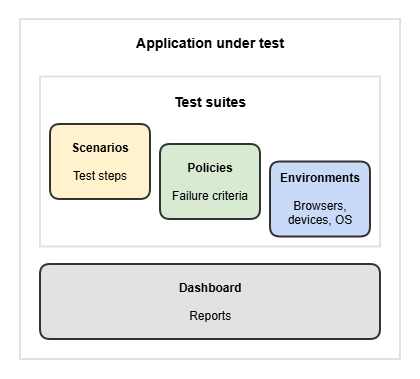
Define your application, scenarios, environments, and success criteria in natural language. Perforce Autonomous Testing generates and executes the required tests automatically using Perfecto and BlazeMeter. This capability enables a single, streamlined workflow for creating, managing, and executing tests across mobile and web applications.
To access Perforce Autonomous Testing, go to https://<your_organization>.autonomous-testing.perforce.com.
When to use Perforce Autonomous Testing?
Use Perforce Autonomous Testing when you need to:
- Run the same tests across multiple devices, browsers, and operating systems
- Avoid maintaining separate test scripts for different environments
- Centralize and reuse pass/fail criteria
- Monitor test execution and review reports
Requirements
-
A valid Perfecto license
-
A valid BlazeMeter license
Try these examples
Describe your application, test scenarios, failure criteria, and environments, and the assistant sets everything up for you.
Get started now and try out the following examples:
-
AI-powered projects: Describe your application under test and let the assistant set up the project. Schedule test executions and view detailed reports on the dashboard.
-
Describe scenarios: Describe test steps to create scenarios. Scenarios that should run together are stored in test suites.
-
Choose test environments: List browsers, versions, and operating systems, and the assistant remembers them as your test environments. You no longer need to maintain separate scripts for different environments!
-
Define global failure criteria: Describe global performance criteria and the assistant saves them as your policies. Assign policies to test executions as needed.