BlazeMeter Service Virtualization MCP server
Virtual services emulate the behavior of unavailable or expensive web services to remove dependencies during development and testing. The MCP (Model Context Protocol) server for BlazeMeter service virtualization provides a local, on-premise solution for integrating AI-driven capabilities with the BlazeMeter service virtualization platform. This MCP server enables advanced automation and analysis features for creating and running virtual services and makes service virtualization accessible to non-technical users through its conversational interface.
For related BlazeMeter MCP servers, see also Performance test MCP server and API Test MCP server.
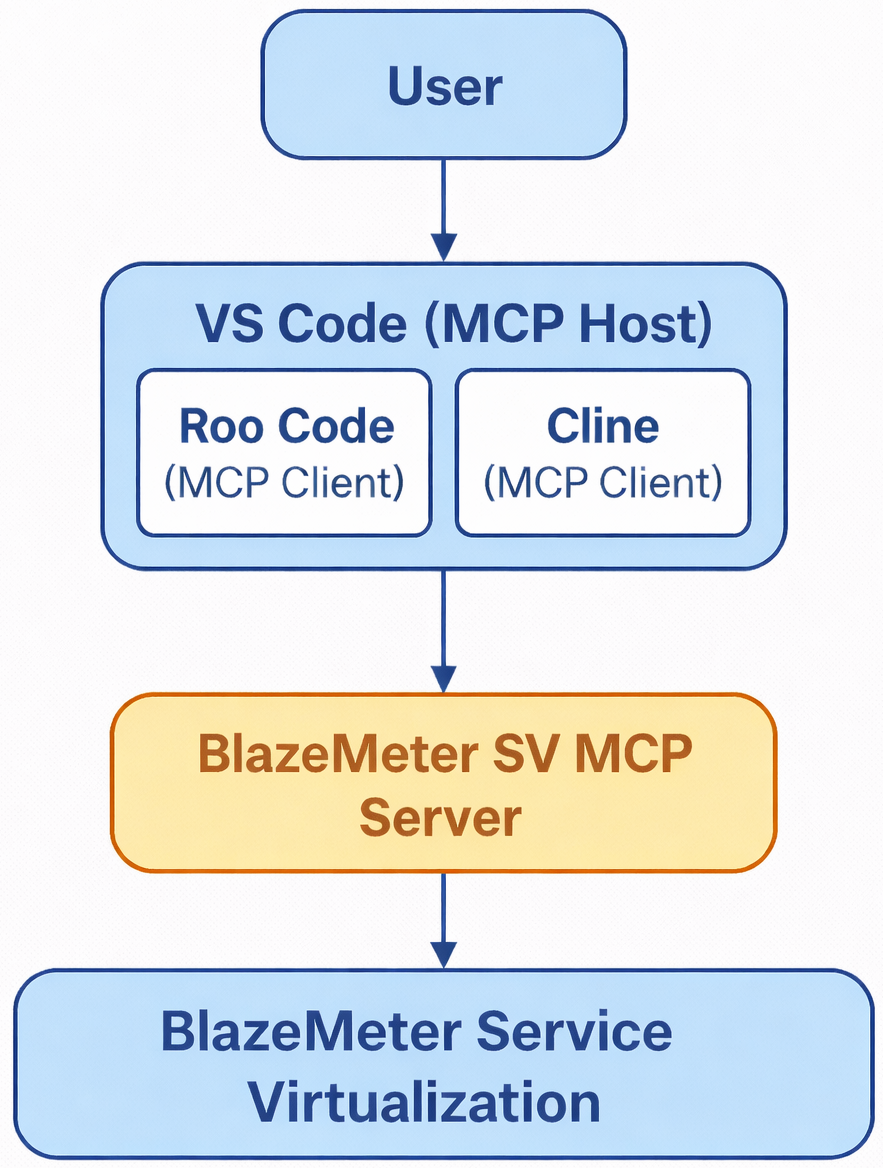
What you can do with the SV MCP Server
The service virtualization MCP server is built for developers and QA teams who want to enable AI agents, assistants, and chatbots to manage entire service virtualization workflows using natural language queries.
Through MCP integration with service virtualization, developers can:
-
Query a BlazeMeter service virtualization project, workspace, or account
-
Create, deploy, and stop virtual services
-
Create and assign HTTP transactions
-
Validate transactions in a sandbox
-
Create reusable virtual service templates
-
Manage keystores
Example prompt:
Create a service "demo template service" in my active workspace.
Create a transaction with name "txn", method matcher POST, url /test
For the response, extract the value of the XML element name from the following request body:
    <product>
    <name>Book</name>
    </product>
The template must use Handlebars xPath helper and should correctly
select the inner element value using an XPath expression.
The expected output from the template should be the value of the
inner field (Book) when the request body matches the structure above.
Validate this template.
Also validate this transaction in the sandbox
Then create a virtual service VS1 in a US location, assign this transaction, and deploy it.
Prerequisites
Only Docker-based deployment is supported.
-
BlazeMeter API credentials: API Key ID and Secret. See BlazeMeter API keys.
-
Compatible MCP client (VS Code, Claude Desktop, Cursor, Windsurf, etc.)
-
Docker
Installation
The SV MCP server supports two modes:
"type":"stdio"
STDIO mode (default)
"type": "streamable-http"
HTTP mode (streamable HTTP)
To learn more about where to find your API keys, see BlazeMeter API keys.
 How to run the client config
STDIO mode (default)
To configure the default STDIO mode, you need only the client config.
Client config
{
    "STDIO VS MCP": {
        "STDIO VS MCP": {
            "timeout": 60,
            "type": "stdio",
            "command": "docker",
            "args": [
                "run",
                "--rm",
                "-i",
                "-e",
                "API_KEY_ID=your_API_key_id",
                "-e",
                "API_KEY_SECRET=your_API_key_secret",
                "-e",
                "SOURCE_WORKING_DIRECTORY=/tmp",
                "-v",
                "/host/assets/path",
                "us-docker.pkg.dev/verdant-bulwark-278/sv-mcp/sv-mcp:latest"
            ]
        }
    }
}
HTTP mode (streamable HTTP)
To enable HTTP mode, set the environment variable MCP_MODE=http and expose port 8000.
Start the server first before the client connects to it.
Run
In the bash terminal , run:
docker run --rm -i -e MCP_MODE=http -e SOURCE_WORKING_DIRECTORY=/tmp -e API_KEY_ID=key -e API_KEY_SECRET=secret -p 8000:8000 --network host -v /host/assets/path:/tmp us-docker.pkg.dev/verdant-bulwark-278/sv-mcp/sv-mcp:latest
The server will be available at: http://localhost:8000/mcp
Client config
{
    "mcpServers": {
        "my-server": {
            "type": "streamable-http",
             "url": "http://localhost:8000/mcp"
         },
    }
 }
Enable or disable MCP tools
The MCP server supports enabling or disabling specific tools at startup using the environment variable MCP_ENABLED_TOOLS. If the environment variable is not set or is an empty string, all available tools are automatically enabled. To enable only certain tools, set the environment variable to a comma-separated list of tool names. For example:
MCP_ENABLED_TOOLS="blazemeter_user,blazemeter_account,virtual_services_virtual_service"
For a list of tools, see BlazeMeter Service Virtualization MCP Server tools reference.
Support and licensing
- GitHub issues
- Perforce Support portal
-
This project is licensed under the Apache License, Version 2.0. Please refer to LICENSE for the full terms.