Add parameter options and dynamic responses to transactions
Service virtualization transactions in the asset catalog support the use of parameter options to allow for more dynamic, realistic response data. You can reference values in a transaction request to ensure that they are repeated appropriately in the response body.
For example, if your transaction is requesting a name, you can configure the response to return a static or random name, or use JavaScript functions to calculate dynamic, complex response values. For alternative methods, see also Create complex matching expressions using the AI Assistant and Generate paths for request matching and dynamic responses.
There are two important components to writing dynamic responses:
- The parameters that control which data is returned, often based on request values
- Helpers that control the format of the returned data. For the full list, see also Dynamic responses: Supported helper functions.
To add dynamic responses to a transaction, use the following functions:
- Import transactions with dynamic responses from WireMock or RR pairs
- Add dynamic responses manually
- Use JavaScript for complex data manipulation
Import transactions with dynamic responses
BlazeMeter supports preserving dynamic data from imported WireMock transactions. WireMock uses Handlebar helper functions to dynamically generate responses, and BlazeMeter supports those functions. WireMock uses {{...}} notation, while BlazeMeter uses ${...} notation; however, BlazeMeter automatically adjusts the WireMock notation during import.
BlazeMeter also handles dynamic responses from imported RR pairs, as long as they use the supported ${...} notation.
For programmable data manipulation, BlazeMeter supports JavaScript syntax.
For other source formats, like HAR, Swagger, and WSDL, import with dynamic responses data is not supported.
Add dynamic responses to a transaction
When you add dynamic responses to an imported or manually created transaction, you enrich the response data with information from the request. The referenced information can be either in a query parameter, the request header, a request cookie, or the request body.
Follow these steps:
- Open a transaction in the Asset catalog.
- Examine the request data for potential values you want to parameterize and return in the response.
- Edit the response body to reference these values.
All dynamic responses must be contained within${...}notation. To learn more, see Dynamic response examples.
If you want to see a static response with a dollar curly bracket symbol (like${XYZ}), use the backslash as an escape symbol in the response. For example, if you want to display the response${xyz}at runtime, use the syntax\${xyz}in the transaction's response body. -
To return values in the response based on request data, use one of the following helpers:
request.query.<parametername>
Returns the value of the specified query parameter.request.headers.<headername>
Returns the value of the specified header. Within the response header, we are only evaluating the Value section. The Name in the header is not part of the dynamic response.request.cookies.<cookieid>
Returns the value of the specified cookie.request.body
Returns the full request body.
Other helpers are available to configure formatting, conditional responses, numeric data, and more. For a list of all available helpers, see Supported helper functions.
- Save the transaction.
You can give certain parameters random values, while others can return an exact value from the request. For example, if a request is asking to create a user account, you can configure the response to return the requested data in the response.
Dynamic response examples
Here are a few simple examples of dynamic response usage:
Return request query parameter values
Consider a marketing system with lead information. You want to return records matching a specific type of lead.
This transaction looks up leads with a status of HOT:
http://localhost:64755/leads?status=HOT
The following transaction response configuration will return response information with the desired status:
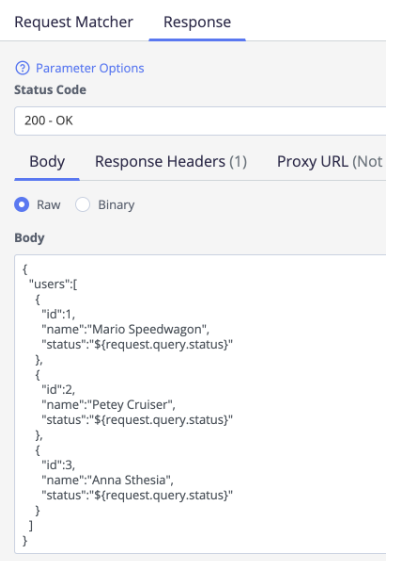
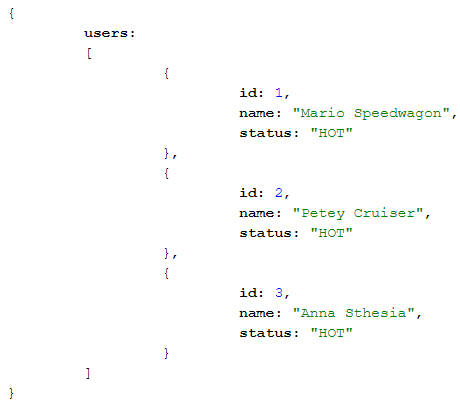
This configuration sets the status value to whatever you specify in the transaction. Using this configuration, the original transaction returns the following data:
Return request header values
This example uses the Accept request header to send either a JSON or XML response based on the response time:
${#assign "mediaType"}${request.headers.Accept}${/assign}
${#eq mediaType 'application/json'}
{
  "users":[
    {
      "id":1,
      "name":"Mario Speedwagon",
      "status":"${request.query.status}"
    },
    {
      "id":2,
      "name":"Petey Cruiser",
      "status":"${request.query.status}"
    },
    {
      "id":3,
      "name":"Anna Sthesia",
      "status":"${request.query.status}"
    }
  ]
}
${/eq}
${#eq mediaType 'application/xml'}
<?xml version="1.0" encoding="UTF-8"?>
<root>
   <users>
      <id>1</id>
      <name>Mario Speedwagon</name>
      <status>${request.query.status}</status>
   </users>
   <users>
      <id>2</id>
      <name>Petey Cruiser</name>
      <status>${request.query.status}</status>
   </users>
   <users>
      <id>3</id>
      <name>Anna Sthesia</name>
      <status>${request.query.status}</status>
   </users>
</root>
${/eq}
Consider the following example transaction:
https://mockservicejan3130547pm839-8080-default.mock-new.blazemeter.com/leads?status=HOT
With the dynamic response data entered into the transaction, it will return a value of HOT for the status and return the data in XML or JSON depending on the Accept header value in the request.
Here is the response to the example transaction with an application/xml Accept header value:
<?xml version="1.0" encoding="UTF-8"?>
<root>
   <users>
      <id>1</id>
      <name>Mario Speedwagon</name>
      <status>HOT</status>
   </users>
   <users>
      <id>2</id>
      <name>Petey Cruiser</name>
      <status>HOT</status>
   </users>
   <users>
      <id>3</id>
      <name>Anna Sthesia</name>
      <status>HOT</status>
   </users>
</root>
Here is the response to the example transaction with an application/json Accept header value:
{
  "users":[
    {
      "id":1,
      "name":"Mario Speedwagon",
      "status":"HOT"
    },
    {
      "id":2,
      "name":"Petey Cruiser",
      "status":"HOT"
    },
    {
      "id":3,
      "name":"Anna Sthesia",
      "status":"HOT"
    }
  ]
}
User name lookup - GET request
This transaction looks up a user name based on an ID number:
curl -X GET "https://contactapp.example.io/contact/1567" -H "accept: application/json"
While you might have recorded a few responses, you might also want a transaction that returns realistic data when the other transactions with recorded data are not matched.
The request URL in BlazeMeter would look like this:
/contact/.*
To return a realistic ID and name value in the response, you would add the following to the Response Body:
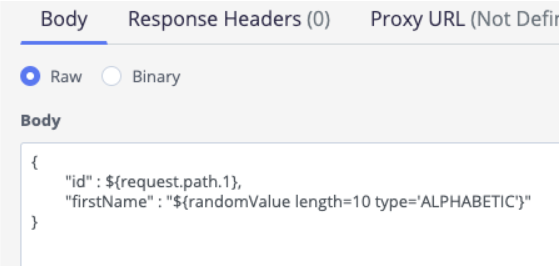
The request.path entry tells the response to use the first value in the request path as the value for the id parameter.
For the firstName parameter, the dynamic response creates a random alphabetic value of ten characters.
Account creation - POST request
This transaction creates an account using a POST request with the required account data:
curl -X POST "https://contactapp.example.io/contact" -H "accept: application/json" -H "Content-Type: application/x-www-form-urlencoded" -d "firstName=John&lastName=Doe&phone=(999)-999-9999"
You want the response to return the requested data in the following format:
{
 "id" : 3461,
 "firstName" : "John" //The first letter should be capital
 "lastName" : "DOE" //The whole string should be in upper case
 "phone" : "(XXX)-XX-9999" // Only the last 4 digits needs to be visible
}
Here is how you would format the transaction response body:
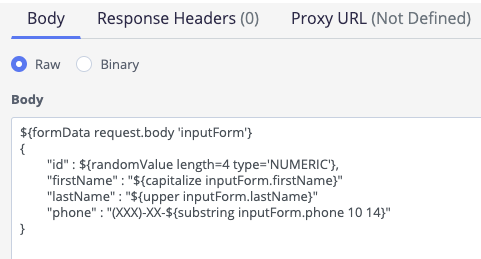
The inputForm argument specifically references the parameters from the request. Each of the three parameters also includes a helper that puts the output in the desired format.
Use JavaScript for complex data manipulation
WireMock Handlebars cannot process values from the incoming request payload to calculate an outgoing response. To extend the templating capabilities of handlebars, BlazeMeter supports programmable data manipulation through JavaScript syntax.
Use the ${#script} handlebars helper to implement advanced business logic, request validation, conditional routing, data transformation, and dynamic response generation beyond the capabilities of template-based rendering.
Enable JavaScript in handlebar helpers
You can use JavaScript in handlebar helpers inside the Body, Request, and Response definitions of transactions. There are two cases, either you use pure JavaScript, or a NodeJS JavaScript that loads a library.
To enable JavaScript globally, go to the virtual service's Runtime Properties and select Scripts enabled. When disabled, ${#script} blocks are treated as unknown helpers and are rendered as their raw text body.
NodeJS is supported only in private locations and always disabled for cloud locations. The JavaScript is executed at response-generation time using a real V8 (or Node.js) engine. To enable NodeJS support, go to the virtual service's Runtime Properties and select NodeJS enabled. When enabled, Node.js globals such as require(), Buffer, process, and others are available.
Reference the default return variable
${#script}
<javascript expression or block>;
${/script}
The last evaluated expression in the block is returned as the script's result. The result is stored in the Handlebar context under the default variable name scriptresult. The helper tag itself renders as an empty string, that is, the result is not returned automatically. Reference the result with ${scriptresult}.
The following example returns Greeting: Hello World:
${#script}'Hello World';${/script}
Greeting: ${scriptresult}
Reference a named result variable
To store the result under a custom key, such as ${result}, pass a variable name as the block argument:
${#script result}42;${/script}
The answer is ${result}
Multiple named script blocks can communicate through the shared context. Previous variables can be arguments in later helpers:
First:  ${#script result1}10;${/script}
Second: ${#script result2}20;${/script}
Sum:    ${#script}result1 + result2;${/script}
${scriptresult}
Access the context
All template variables resolved before a script block are exposed to JavaScript as individual global variables. This includes WireMock request data (request), dataset values, configuration parameters, and results stored by earlier ${#script} blocks.
${#script}
if (context.user) {
    context.user.name.toUpperCase();
} else {
    'GUEST';
}
${/script}
${scriptresult}

${#script}context.userId.toUpperCase();${/script}
myVar = "new") does not propagate back to the Handlebars context — the original template variable retains its value. Only ${scriptresult} (or a named result variable) reflects the script's return value.Validate the expression
To validate the template, click the Validate button in the UI.
Type Mapping (from JavaScript to Java)
The result of a script block is converted from a V8 value to a Java object before being stored in the Handlebars context.
| JavaScript type | Java type |
|---|---|
| string | String |
integer number (e.g. 42) |
Integer |
large number (e.g. 9007199254740991) |
Double |
float number (e.g. 9.14) |
Double |
| boolean | Boolean |
| BigInt | BigInteger (or Long) |
| Array | List<Object> |
| plain Object | Map<String, Object> |
| null | undefined | null |
Nested arrays and objects are converted recursively.
Unknown V8 types fall back to value.toString().
JavaScript Examples
Simple string:
${#script}'Hello World';${/script}${scriptresult}
Random integer:
${#script}Math.floor(Math.random() * 100);${/script}${scriptresult}
String manipulation:
${#script}'hello'.toUpperCase() + ' WORLD';${/script}${scriptresult}
Array operation:
${#script}[1, 2, 3].map(x => x * 2).join(',');${/script}${scriptresult}
JSON object:
${#script}JSON.stringify({name: 'John', age: 30});${/script}${scriptresult}
Date:
${#script}new Date().getFullYear();${/script}${scriptresult}
Context access:
${#script}userId.toUpperCase();${/script}${scriptresult}
Mixed template (with other helpers):
{
	"id": ${randomInt lower=1 upper=1000},
	"timestamp": "${now}",
	"user": "${capitalize name}",
	"computed": ${#script}Math.floor(Math.random() * 100);${/script}${scriptresult},
	"condition": ${#if active}"active"${else}"inactive"${/if}
}
Node.js cryptography hash example
This example requires that NodeJS is enabled in the runtime properties. NodeJS is only available on private locations.
${#script}
const crypto = require('crypto');
crypto.createHash('md5').update('test').digest('hex');
${/script}${scriptresult}
Limitations
-
Scripts execute synchronously inside the response pipeline. Long-running scripts will block the response thread.
-
async/awaitandPromisesare not supported in safe V8 mode. -
require()is only available when NodeJS support is enabled. -
The script result is stored in the Handlebars context under the default variable name
scriptresult. -
The script block helper renders as an empty string at the tag location; always reference the result variable explicitly, using
${scriptresult}or your named variable. -
Syntax errors in scripts are reported at template upload time with a line number. Runtime errors (for example
TypeError) produce an error string as the result value rather than throwing errors.