Redirect to live system endpoint
You typically cannot or do not want to virtualize 100% of the service, but only the endpoints that you are testing. BlazeMeter offers the possibility to redirect remaining requests to the live service. You can hard-code the name of the live system endpoint or use dynamic variables in the endpoint definition.
You have two options, redirect all unmatched transactions, or redirect specific matches:
Redirect all to live service
On virtual service level, you can redirect all unmatched requests to the live system.
- Select Redirect to live system in the No matching requests field. A new field Live system endpoint appears.
- Enter the live URL.
The field also supports custom parameters defined in the configurations tab and in the test data pane.- The following example uses configuration parameters:
https://${config.server}:${config.port} - In the following example,
$(config.host}is defined on the configurations tab while${path}and${gvalue}are test data parameters:https://${config.host}/${path}/${gvalue}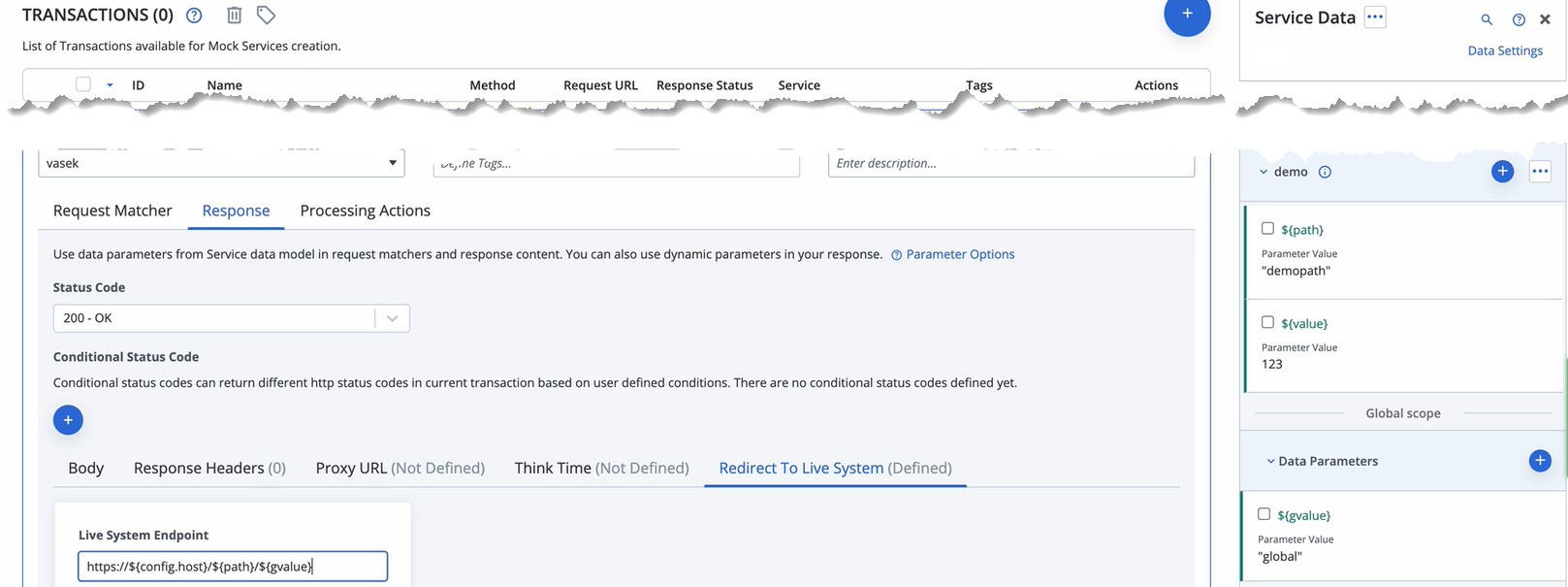
From now on, all requests that are not matched by a transaction are forwarded to the specified endpoint. - The following example uses configuration parameters:
Redirect some to live service
On the transaction level, you can redirect requests that match specific transactions to the live system.
Use the request matchers of transactions as conditions to redirect matching requests to the live system. to enable this behavior, In the transaction editor, open the response tab, and provide the URL of the Live system endpoint on the Redirect to live system tab . The field also accepts test data parameters.
- If you enable Failover mode and the live service fails, the transaction fails gracefully and returns the transaction response.
- You can select an SSL authentication:
- No authentication
- 1-way SSL
- 2-way SSL
Select an existing Keystore or upload a new one. Provide the Keystore password and the password used to access individual keys in the keystore.
(Optional) To define how to identify during SSL/TLS communication using an alias for aprivate key entrydefined in your keystore, select the Alias and provide an Alias password.
Enter the URL in the following format:
http[s]://<HOST>[:<PORT>][/BASE_PATH]
Schema and host are required and everything else is optional.
Examples:
If the Live system endpoint contains value https://live:5443/ser1, the incoming request with https://mock/ping will be forwarded to https://live:5443/ser1/ping .
If the Live system endpoint contains value https://live:5443, the incoming request with https://mock/ping will be forwarded to https://live:5443/ping .
If needed, provide client certificates when calling live endpoints in virtual services, on transactions level, in webhooks and in HTTP processing actions. Every uploaded certificate is stored in the Certificate store and can be reused later.