Manage sensitive data securely with vaults and secrets
Secrets are objects that contain sensitive data, such as passwords, tokens, credit card numbers, or any other data that shouldn't be exposed. You can store secrets in the BlazeMeter default vault, or in an external vault. By using secrets, you do not have to hard code any sensitive data into your test scripts. Whenever an enabled secret appears in reports or logs during and after run time, the value of the secret is replaced with asterisks (*).
To use external vaults and secrets, you need to create them in your workspace settings. To learn more about vaults and secrets in your workspace, see Create and manage vaults.
If your test scenarios require the use of secrets, such as API keys, token, or credentials, be sure that:
- only production and non-sensitive secrets are used.
- all secrets are strictly limited in scope and privilege, and access only test-specific resources or data.
- secrets should be temporary and rotated regularly.
- you avoid the use of secrets that provide access to productions environments or sensitive customer data.
Use vaults and secrets in your virtual services
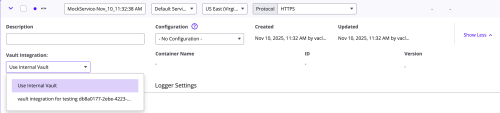
Once you have your vaults and secrets configured in your workspace settings, you can use them in your virtual services. If you decide to use an external vault that you previously set up in your Workspace settings, you can choose it by clicking Show more and then selecting your external vault in Vault Integration.
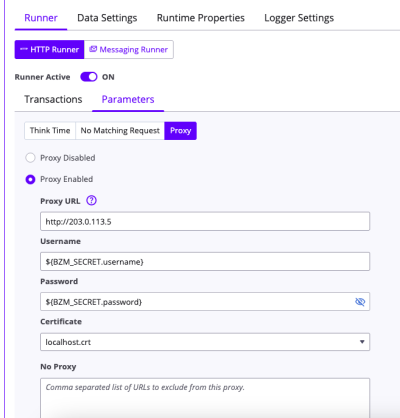
You can reference a configured secret using the prefix BZM_SECRET: ${BZM_SECRET.secretname}