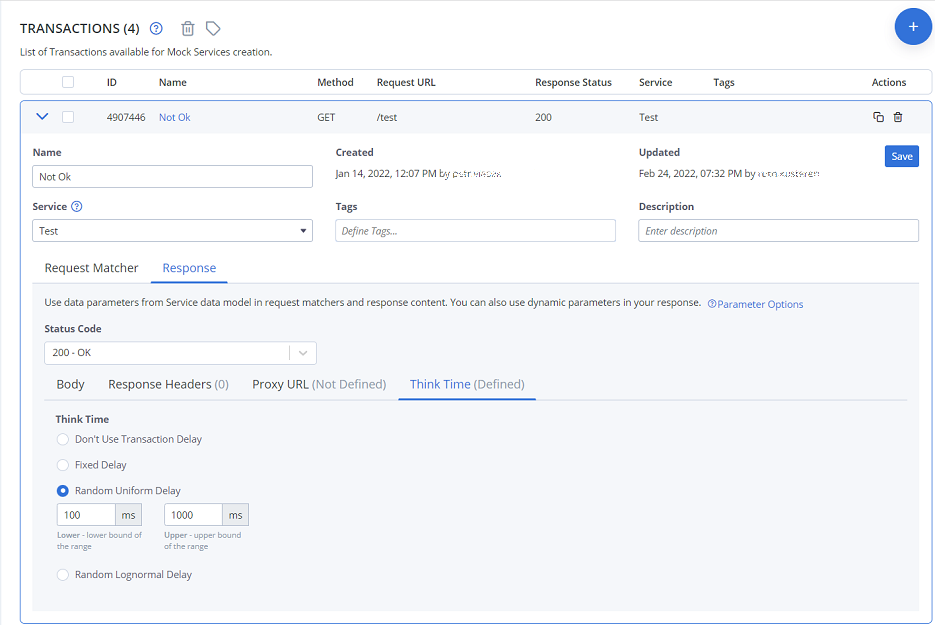
Simulate irregular response latencies (Think time)
One benefit of using virtual services when testing is to introduce irregular behavior that's difficult to get a real web service to produce on demand. A test script rushes through the test steps at the same speed every time, but in BlazeMeter, a transaction can also have a fixed or random-length delay before the response is returned.
BlazeMeter's Think time option introduces a delay that can be used as a factor to simulate slow human responses or network latency. The delay can be a fixed value or can be sampled from a random distribution which makes it easy for you to simulate different types of downstream latencies.
Add delays to responses
There are several ways how to access the Think time tabin the Service virtualization tab:
- To set a think time for individual transactions, go to the Asset catalog tab, open a transaction, and edit the Response parameters.
- To set a think time for the whole virtual service, go to the Virtual services tab, open a virtual service, and go to its Parameters tab.
You have the following options:
Think time
- No delay / Don't use transaction delay
Sets the think time to 0 milliseconds. This is the default. - Fixed delay
Lets you define a fixed response delay in milliseconds. - Random uniform delay
A uniform distribution simulates a stable latency with a fixed amount of jitter.
Example: To simulate a stable latency of 20ms +/- 5ms, use lower = 15 and upper = 25.
This option takes two parameters:- lower - The lower bound of the range, inclusive.
- upper - The upper bound of the range, inclusive.
- Random lognormal delay
A lognormal distribution is a pretty good approximation of long-tailed latencies centered on the 50th percentile.
This option takes two parameters:- median - The 50th percentile of latencies.
- sigma - Standard deviation. The larger the value, the longer the tail.