Release 1.1
BlazeMeter 1.1 was released on January 19, 2026.
Introducing AI Anomaly Analysis
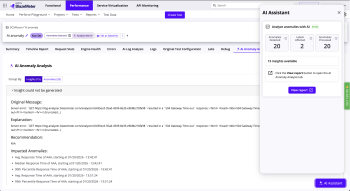
We’re excited to launch AI Anomaly Analysis, the first step toward a fully automated Root Cause Analysis (RCA) experience in BlazeMeter. This new capability helps you understand why anomalies occurred by using AI to analyze relevant log-file errors and highlight the issues most likely behind performance disruptions. You get clearer answers faster — without hours of manual digging.
How BlazeMeter Analyzes Anomalies
When anomalies appear in a test report, BlazeMeter now lets you trigger an AI-driven analysis. The system reviews relevant JMeter log errors that occurred around each anomaly, extracts meaningful error details, and uses AI to group them into distinct issues. In the new AI Anomaly Analysis tab, you see these issues, the anomalies they relate to, and suggested remediation steps. The analysis runs in the background so you can continue working while insights are generated.
Availability
AI Anomaly Analysis is available to all Enterprise customers.
To use it, you need to enable AI consent in your BlazeMeter settings. If consent hasn’t been enabled, you’ll be prompted before running your first analysis.
Service Virtualization—HTTP Recorder
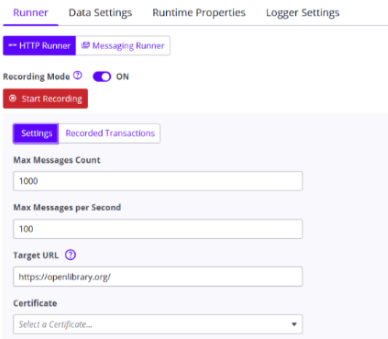
HTTP Recorder is now a part of Service Virtualization! In addition to the existing capability of support for swagger, RR pairs, WSDL, HAR files to create new virtual services, BlazeMeter now supports the ability to create virtual services via recording. Simply provide the backend target endpoint URL, and the HTTP recorder captures the requests and the responses as transactions. These transactions can then be added to a virtual service which stands in for a backend service.
API Monitoring: New scheduling options for more flexibility!
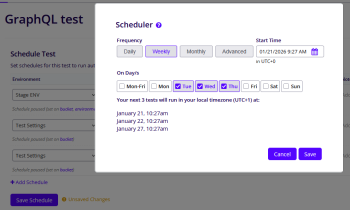
We’ve expanded the scheduling capabilities in BlazeMeter API Monitoring to give you more control over when your tests run. Instead of relying only on fixed intervals, you can now schedule tests at specific times that fit your workflows. Whether that’s early Monday morning, the first day of the month, or any custom pattern you choose.
With new weekly, monthly, and advanced cron‑based options, planning your monitoring routine is easier and far more flexible. You can set an exact start time for the first run, preview upcoming executions, and still fall back on the familiar interval-based scheduling whenever you need it.
These options are available directly in the UI as well as through the API, giving you the freedom to configure your monitoring your way.
What’s new:
-
Schedule tests at specific times (e.g., every Monday at 5 AM).
-
Choose from weekly or monthly presets or define your own schedule using a cron expression.
-
Review the next three planned runs at a glance.
-
Edit existing schedules easily.
-
Keep using simple interval-based scheduling if you prefer.
Service Virtualization—MCP Server
The BlazeMeter Service Virtualization MCP Server integrates BlazeMeter Service Virtualization with AI-powered developer tools through the Model Context Protocol (MCP). This integration enables AI assistants to invoke Service Virtualization capabilities—such as creating transactions, configuring virtual services, and managing deployments—using natural language within structured MCP workflows.
The MCP server streamlines the testing lifecycle by allowing you to define, update, and deploy virtual services directly from your IDEs, without requiring interaction with the BlazeMeter UI. The MCP Server is delivered as a Docker image and can be deployed via popular MCP clients such as Roo Code and Cline, running within MCP hosts like VS Code, Claude Desktop, and Cursor—bringing BlazeMeter’s enterprise-grade service virtualization directly into AI-driven development workflows.