Choose the right request matchers
To match transactions against the appropriate range of potential requests that you are testing, write request matchers for specific URLs, query parameters, body contents, credentials, or cookies, or a combination of several of them.
To learn more about how to write dynamic matching expressions, see also Create complex expressions using natural language, Generate paths for request matching and dynamic responses, and the blog How to do advanced request matching with BlazeMeter.
URL
The URL is the primary request URL. You can format the URL in a variety of ways for matching purposes, including:
- A complete request URL that will only match when the virtual service receives that exact request. Use the
equalssetting for this type of request. Any parameters must be entered in the query parameters section. - A partial request URL with regular expression text that will return a dynamic match for any request that matches the expression criteria. Use the
matches regexsetting for this type of request. - A complete request URL that serves as the root of a request with parameters or other information that you include in the other matching fields. For example, you can include a root URL, and then enter parameter matching criteria in the query parameters section that uses regular expressions.
Example 1:
The following URL returns a direct match of the AWS S3 API GET request for a specific object named report.json:
GET https://mybucket.s3.eu-central-1 .amazonaws.com/report.json

Example 2:
This URL returns a match for a petstore API GET request that includes the string 'dog' in its path:
GET https://petstore.blazemeter.com/api/pets/.*dog.*
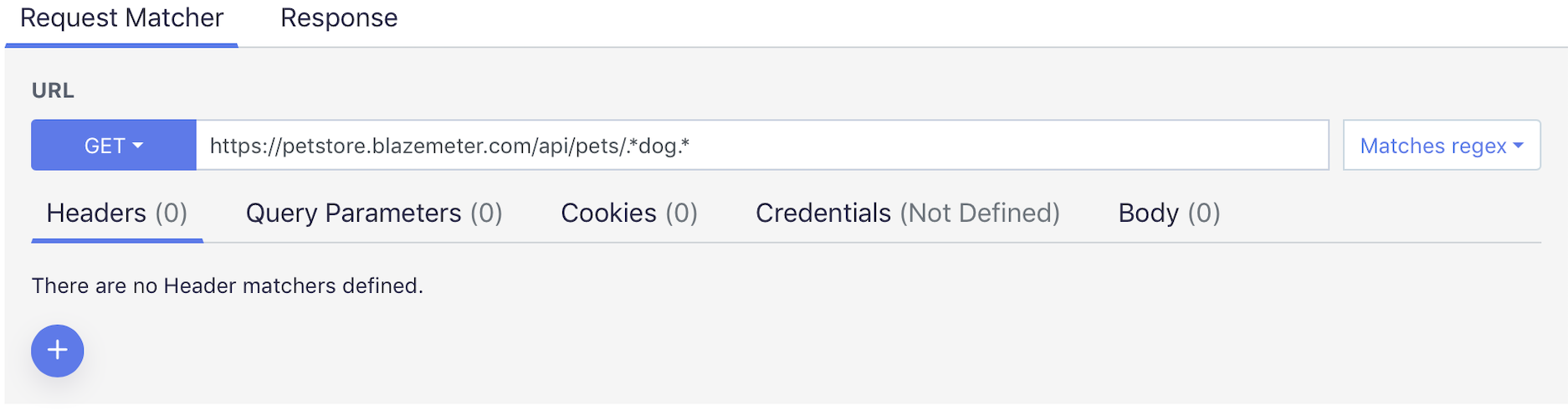
Example 2 matches:
- https://petstore.blazemeter.com/api/pets/dogs
- https://petstore.blazemeter.com/api/pets/animals/dog
- https://petstore.blazemeter.com/api/pets/animals/dogs/small
Example 2 does not match:
- https://petstore.blazemeter.com/api/pets/cats
- https://petstore.blazemeter.com/api/pets/Dogs
The RegEx matches are case sensitive.
Headers
Use the headers field to define all headers that must be present to return a match. The header value can be an exact value or a regular expression.
When you define multiple headers, all headers much be present for the request to match. If headers are optional, deselect their Required checkbox.
Example:
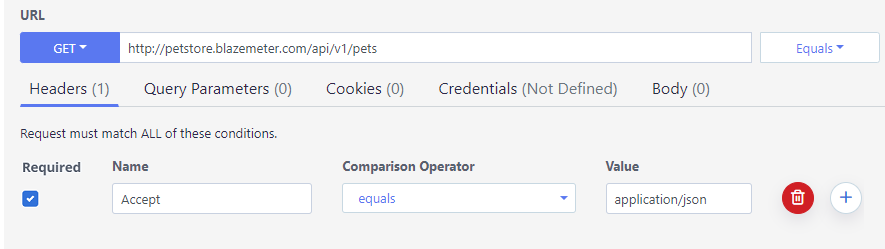
This URL returns a match for a petstore GET request when an Accept header is included with the exact value of application/json.
Host header in any request matching criteria, as it can adversely affect transaction matching.Query parameters
Use query parameters to define a range of parameters that will result in a match. You can include multiple parameters, and the parameters can be exact values or regular expressions.
When you define multiple parameters, all parameters much be present for the request to match. If parameters are optional, deselect their Required checkbox.
When you use an equals matcher with query parameters, the incoming value is decoded before the comparison is made. Therefore, if you are trying to match on a value that is encoded within a URL, like "http://notreal/?status=25%25%20full", use the decoded value in the matcher ("25% full") instead of the encoded value in the URL.
Example 1:
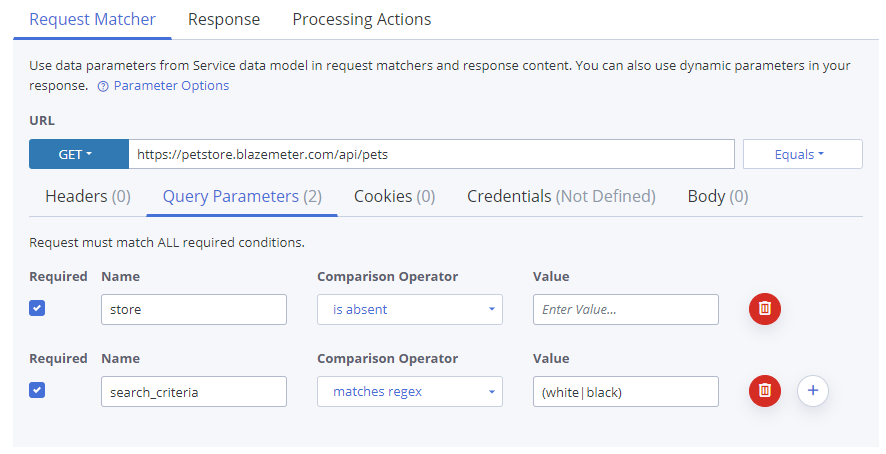
The example request in the screenshot matches any time when the URL matches the given URL and the search_criteria query parameter is present with any value, including an empty value. If the optional pet parameter is in the request, its value must match cat to match, but if pet is not part of the request, then the value cat is not considered.
Example 1 matches:
https://petstore.blazemeter.com/api/pets?search_criteria=brown
https://petstore.blazemeter.com/api/pets?search_criteria=white&pet=cat
https://petstore.blazemeter.com/api/pets?search_criteria
Example 1 does not match:
https://petstore.blazemeter.com/api/pets
https://petstore.blazemeter.com/api/pets?pet=dog
https://petstore.blazemeter.com/api/pets?search_criteria=white&pet=dog
https://petstore.blazemeter.com/api/pets?page=1
Example 2:
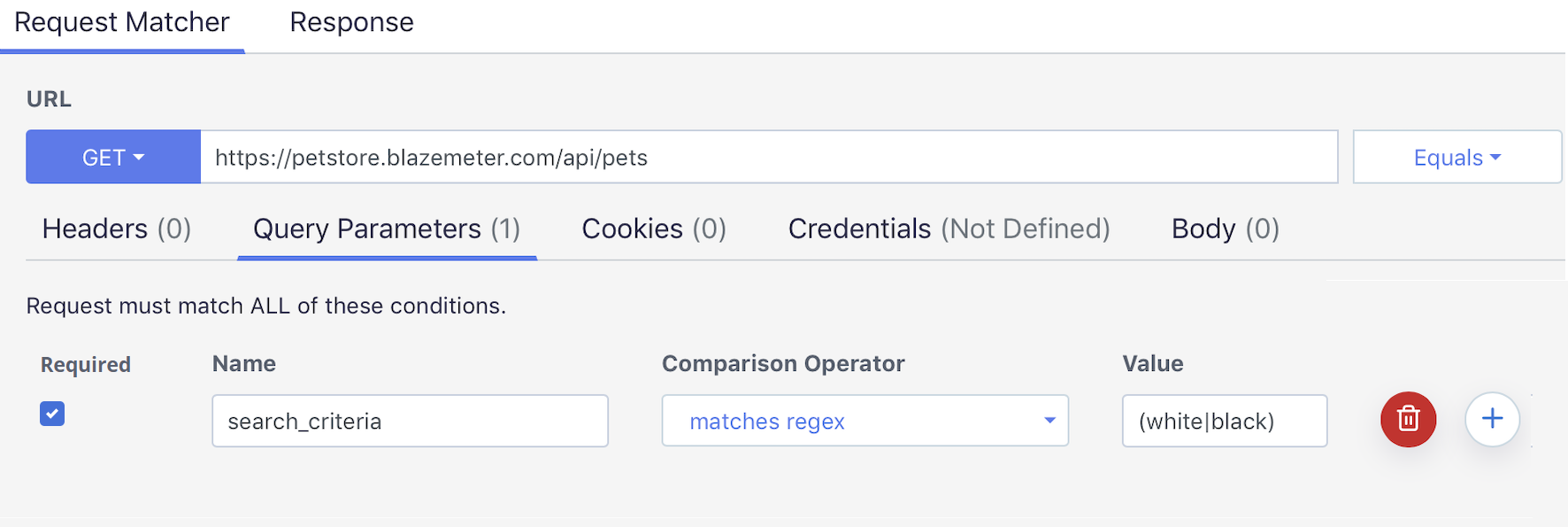
The second example matches any request when the URL matches the URL and the search_criteria parameter contains the values white or black, defined through the standard regular expression (white|black).
Example 2 matches:
https://petstore.blazemeter.com/api/pets?search_criteria=black
https://petstore.blazemeter.com/api/pets?search_criteria=white
Example 2 does not match:
https://petstore.blazemeter.com/api/pets?search_criteria=brown
https://petstore.blazemeter.com/api/pets
Example 3:
The third example matches a request that contains the values white or black in the search_criteria query parameter (defined as regular expression) and does not contain the query parameter store.
Example 3 matches:
https://petstore.blazemeter.com/api/pets?search_criteria=black
https://petstore.blazemeter.com/api/pets?search_criteria=white&page=1
Example 3 does not match:
https://petstore.blazemeter.com/api/pets?search_criteria=white&store=london
https://petstore.blazemeter.com/api/pets?store=london
https://petstore.blazemeter.com/api/pets?page=1
Cookies
Include cookies if the request needs to pass certain cookies to return a match.
Credentials
Include credentials if the request needs to include specific credentials to return a match.
Body
Include body text in the body section if the request needs to include specific text in the request body to return a match. You can include multiple match conditions that are important to you without having to define the entire request body.
If you simply included the entire literal request body, any small deviation in the body content would cause the transaction to not match.
If you, instead, include a match condition looking for, for example, an XPATH state, and a second match condition looking for a status code in the body, then the entire request body does not have to match. Only the XPATH state and status code that you specified must match.
To match the content of XML or JSON documents semantically, while ignoring the formatting, use the Equals XML or Equals JSON matchers. These matchers ignore superficial formatting such as extra whitespace and the order of fields.
To match JSON or XML fields that contain specific values, while the rest of the fields can have any value, use placeholders.
Examples:
- Examples of JSON placeholders:
${json-unit.any-string}${json-unit.any-number}${json-unit.ignore}- and other JSON Unit declarations.
The following JSON Body Matcher requires a string match for "name": "John", and accepts any content for the membership and email fields:
{
  "name":        "John",
  "membership": "${json-unit.any-string}",
  "email":      "${json-unit.ignore-element}"
} - Examples of XML placeholders:
${xmlunit.isNumber}${xmlunit.ignore}- and other declarations from XML Unit.
-
Examples how to add a WSDL schema file (xsd) for validation:
-
Either copy and paste the xsd into the text area.
-
Click the arrow and drag and drop the xsd file into the text area.
-
Click the arrow and upload the xsd file.
-