Radar agent changelog
The following are released versions of the BlazeMeter API Monitoring Radar agent:
| Version | Release Date |
| 1.35 (current, latest) | Aug 3, 2026 |
| 1.34 | June 2, 2026 |
| 1.33 | May 12, 2026 |
| 1.32 | Apr 1, 2026 |
| 1.31 | Sep 2, 2025 |
| 1.30 | Aug 5, 2025 |
| 1.28 | Jul 9, 2025 |
| 1.27 | Mar 17, 2025 |
| 1.26 | Oct 28, 2024 |
| 1.25 | Oct 17, 2024 |
| 1.24 | Sep 26, 2024 |
| 1.22 | Jun 1, 2024 |
| 1.21 | May 23, 2024 |
| 1.20 | Apr 9, 2024 |
| 1.18 | Sep 14, 2023 |
| 1.17 | Aug 31, 2023 |
| 1.16 | Jul 19, 2023 |
| 1.15 | Jun 28, 2023 |
| 1.13 | May 3, 2023 |
| 1.11 | Jan 30, 2023 |
| 1.10 | Nov 3, 2022 |
| 1.9 | Oct 21, 2022 |
| 1.8rc | Jun 13, 2022 |
| 1.6rc | Jan 18, 2022 |
| 1.5rc | Jan 5, 2022 |
| 1.4rc | Dec 21, 2021 |
| 1.3rc | Nov 11, 2021 |
| 1.2rc | Oct 5, 2021 |
| 1.1rc | Sep 30, 2021 |
| 1.0rc | Sep 28, 2021 |
What's new in 1.35
Bug Fix: OAuth 2.0 token requests for public clients through a private location
We fixed an issue where OAuth 2.0 token requests routed through a private Radar agent location included an empty client_secret parameter for public clients (clients with no secret configured). Some authorization servers reject this as an invalid request. Radar agents now omit client_secret from the token request when no client secret is configured.
What's new in 1.34
OAuth 2.0 Token Requests via Private Location
A new Token Request Location option is now available in the OAuth 2.0 authentication settings for both test environments and individual steps. When a private Radar agent location is selected, that agent handles the OAuth 2.0 token exchange — including the initial token request, callback URL redirects, and automatic token refresh when the Auto-Refresh Token option is enabled.
This makes it possible to test against OAuth-protected APIs whose authorization servers are only reachable from within a private network.
What's new in 1.33
WebSocket testing support
Radar agents now support WebSocket API testing and monitoring. You can write test steps that establish a WebSocket connection, send messages, receive responses, and assert on the data returned — all through your private Radar agent location.
For more information, see WebSocket Testing.
Removal of use-system-certs flag and mkcert.org dependency
The use-system-certs command line flag and configuration file option has been removed, along with the dependency on downloading a certificate authority bundle from https://mkcert.org/generate. Radar agents now exclusively use system/OS-level certificates for HTTPS authentication. This was already the default behavior since version 1.20, so most agents are unaffected. If you were explicitly setting use-system-certs=false in your configuration, remove that option before upgrading.
Bug Fix: Binary image data preserved in POST requests
Fixed an issue where binary image data in POST request bodies was not being preserved correctly due to a base64 encoding error. Binary file content is now transmitted properly through test steps.
What's new in 1.32
Increased response body limit
The maximum response body size that BlazeMeter API Monitoring can store and display has been increased from 1 MB to 5 MB. This feature is enabled at the team level — contact BlazeMeter support to have it enabled for your team. Once enabled, the Radar agent will read and make available response bodies up to 5 MB for use in assertions and test results.
Built using Golang 1.25 and Alpine 3.23
The Radar agent is now compiled using Golang 1.25 and uses Alpine Linux 3.23 as its base image. This update includes security fixes including a resolution for CVE-2026-27141 in the Go networking library.
Bug Fix: Advanced Diagnostics ping and traceroute scans
Fixed an issue where diagnostic ping and traceroute scans were generating errors on Radar agents that do not have the Advanced Diagnostics feature enabled.
What's new in 1.31
Presigned S3 URLs for remote Radar agents
Radar agents now use presigned S3 URLs to access files that are used during POST/PUT test requests. This fixes previous file upload errors due to remote Radar agents not having privilege access to specific S3 buckets.
Deprecation of Runscope name in notices and logs
We replaced "Runscope" with "BlazeMeter API Monitoring" in notices and logs for Radar agents.
What's New in 1.30
Improved DNS resilience to handle intermittent failures
DNS lookups are now retried up to 5 times. This is designed to handle intermittent errors with DNS servers or short-lived “no such host” errors that cleared up as DNS records are updated.
What's New in 1.28
Custom HTTP status code of ‘50000’ for DNS-related errors
All DNS failures now return a response.status_code of 50000, making them easy to identify without opening the failed test.
What's New in 1.27
Bug Fix
Fixed an issue with decrypting private keys that require a passphrase when performing two-way authentication (mTLS) with an HTTPS server.
What's New in 1.26
Allow Radar Agents to Be Hidden from Other Users
A new --private flag has been added to the Radar agent so that it is only visible to the user that created it. This defaults to false, meaning that it is visible to every user in the team that the Radar agent is associated with.
For more information, see Command Line Flags / Configuration File Reference in Radar Agent Overview.
What's New in 1.25
Custom Proxy support in BlazeMeter
With the new custom proxy setup in Test Settings, you can now route requests through a designated proxy server. This feature allows you to test APIs from various environments, supporting both HTTP and HTTPS endpoints, and provides greater flexibility for running secure, network-routed tests.
For more information, see Managing Configuration with Environments.
What's New in 1.24
GraphQL support
BlazeMeter now supports GraphQL-based API testing and monitoring.
What's New in 1.22
Bug fix
Fixed a defect with the Radar Agent not reporting failures in a timely manner (TT-4108).
What's New in 1.21
Built using Golang 1.21.10
The Radar Agent is now compiled using Golang 1.21.10. This release of Golang fixes several vulnerabilities and addresses a regression related to HTTP/2 client performance.
What's New in 1.20
Radar Agent as a Container
A Docker image is now available for the Radar Agent so that it can be run as a container. Additionally, a Helm chart is available to help deploy your Radar Agent to a Kubernetes environment. For more information, see Running the Radar Agent as a Container.
Use system/OS-level provided certificates by default for HTTPS authentication
Starting with version 1.20, the Radar Agent now defaults to using system/OS-level provided certificates for HTTPS authentication. This behavior is identical to the use-system-certs command line flag or config file option being set to true.
Previously, the default value of the use-system-certs command line flag or config file option was false, which forced the Radar agent to download and use a certificate authority bundle from https://mkcert.org/generate for HTTPS authentication.
If you do not want to use certificates provided by your system/OS and would prefer for the Radar Agent to download and use a certificate authority bundle from https://mkcert.org/generate for HTTPS authentication, set the use-system-certs command line flag or config file option to false. For more information, see "Command Line Flags/Configuration File Reference" in Radar Agent Overview.
What's New in 1.18
Universal macOS binary of the Radar agent
You can now use a universal macOS binary to run on Intel or ARM processors.
Removal of 32-bit Windows and Linux Radar agents
The latest Radar agent supports 64-bit versions of Windows and Linux.
Standardized error handling for AWS S3 binary and multipart files
Fixed an issue to handle binary file S3 errors in the same way as multipart file S3 errors.
What's New in 1.17
Improved AWS S3 connection for binary file upload
Fixed an issue with connecting to AWS S3 services when performing a binary file upload from a test step.
What's New in 1.16
Support for binary file uploads and request chaining
We implemented a fix to support adding binary files and passing the decoded data to another request. For more information, see File Uploads and Multipart Requests.
Improved efficiency of HTTP connections
We addressed issues to improve speed and efficiency of HTTP connections with API Monitoring services.
What's New in 1.15
Local client authentication configuration options
To allow locally hosted certificate and key files to be used for client authentication in a two-way HTTP authentication setup (mTLS), we added several new command line flag or config file options:
-
cert - Client certificate file (PEM-encoded) for two-way HTTPS authentication
-
key - Client key file (PEM-encoded) for two-way HTTPS authentication
-
pass - Passphrase for client key file
For more information, see Command Line Flags / Configuration File Reference in Radar Agent Overview.
Use system/OS-level provided certificates for HTTPS authentication
By default, the Radar agent will attempt to download and use a certificate authority bundle from https://mkcert.org/generate for HTTP authentication. If you need to use certificates provided by your system/OS, the use-system-certs command line flag or config file option is available.
For more information, see Command Line Flags / Configuration File Reference in Radar Agent Overview.
What's New in 1.13
Improved logging for configuration of trusted root certificates
Radar agent 1.13 adds improved logging for the configuration of trusted SSL/TLS root certificates.
-
If the cafile option is used, the Radar agent will validate and log the path of the CA bundle file
-
If the cafile option is not used, the Radar agent will log the progress of downloading the CA bundle file from https://mkcert.org/generate
-
If https://mkcert.org/generate can not be accessed, the Radar agent will use an embedded CA bundle file (as of April 10, 2023)
For more information, see Command Line Flags / Configuration File Reference in Radar Agent Overview.
What's New in 1.11
HTTP/2 Support
Radar agents starting with version 1.11 support the use of HTTP/2 when performing test requests. The HTTP version used when performing a test request can be configured in the environment behavior settings associated with your test. By default, HTTP/1 only is enabled.
For more details, see API Monitoring Test Behaviors.
Force h2c (HTTP/2 over cleartext)
Radar agents starting with version 1.11 support forcing the use of HTTP/2 over cleartext, also known as h2c. This is useful for test requests that use URLs with the HTTP scheme to access servers that expect HTTP/2 traffic. This can be configured in the environment behavior settings associated with your test. By default, this is disabled.
For more details, see API Monitoring Test Behaviors.
What's New in 1.10
Use of Hostname in HTTP/S Proxy Connection
When connecting through a HTTP/S proxy, the hostname of a test request URL is now properly used, instead of the IP address of the hostname resolved through DNS.
What's New in 1.9
Radar Agent Version Shown for Each Location
You can now view the radar agent version running on each of your locations, as shown in the following example:
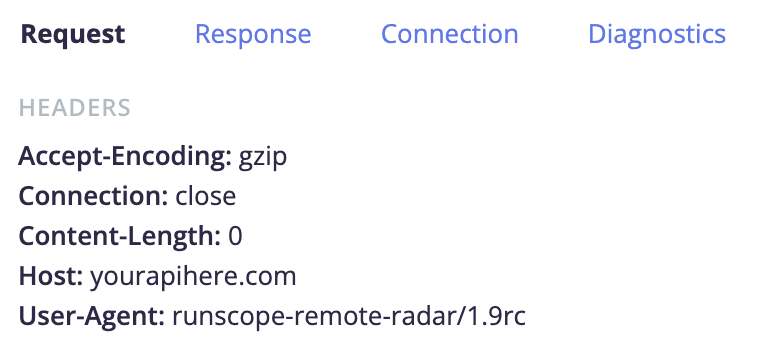
To view the version of your radar agent, navigate to test Steps > Request.
Option to Disable DNS Pre-Check
You have the option to disable DNS pre-checks by using the disable-dns-lookup command line flag or config file option. See Radar Agent Overview and Radar Agent Connection Errors.
Built Using Golang 1.19.1
Radar agents are now compiled using Golang 1.19.1 to support security and infrastructure upgrades.
Removed Support for HTTPS Common Name field in X509 Certificates
The HTTPS Common Name (CN) field is no longer supported as of 1.9rc. For more information and how to work around the issue, see Radar Agent Support for HTTPS Common Name in X509 Certificates.
What's New in 1.8rc
Support for TLS 1.3
The Radar agent now supports TLS versions 1.0 through 1.3.
Built Using Golang 1.16.15
In order to support TLS 1.3, Radar agents are now compiled using Golang 1.16.15.
Starting with Golang 1.15, support for X509 certificates that use a legacy CN (common name) field without a SAN extension entry (Subject Alternative Name) has been removed.
If the Radar agent encounters a HTTPS server that uses this type of X509 certificate, the following error will occur:
x509: certificate relies on legacy Common Name field, use SANs or temporarily enable Common Name matching with GODEBUG=x509ignoreCN=0
You can allow X509 certificates without a SAN entry to be trusted by adding the value
x509ignoreCN=0 to the GODEBUG environment variable and restart your Radar agent: export GODEBUG=x509ignoreCN=0.