September 2025
The following pages provide information on BlazeMeter releases from September 2025.
Release 25-Q3-S6 was delivered on September 29, 2025.
Performance testing
In this release, Performance testing includes the following enhancements:
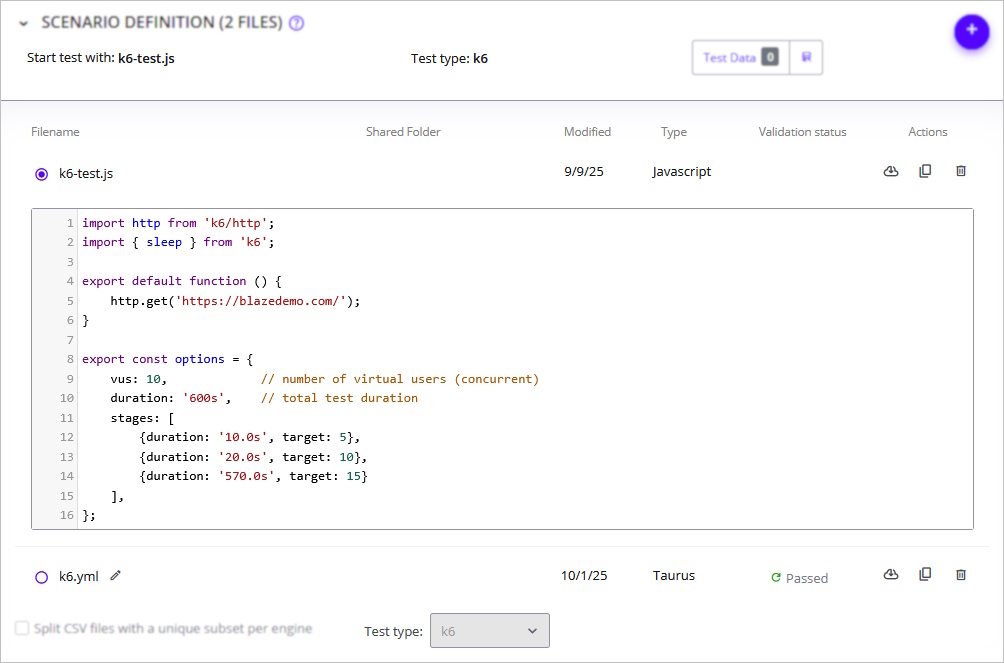
Expanded K6 support in BlazeMeter
BlazeMeter now supports k6 ramp-up (stages) through the Taurus executor, giving users more control over load patterns and realistic traffic simulation. Combined with the recently released ability to edit k6 JavaScript files directly in the BlazeMeter editor, this provides a more seamless workflow for creating, customizing, and running k6 tests.
To learn more, see Creating Performance Tests (k6).
AI Log Analysis Now Available
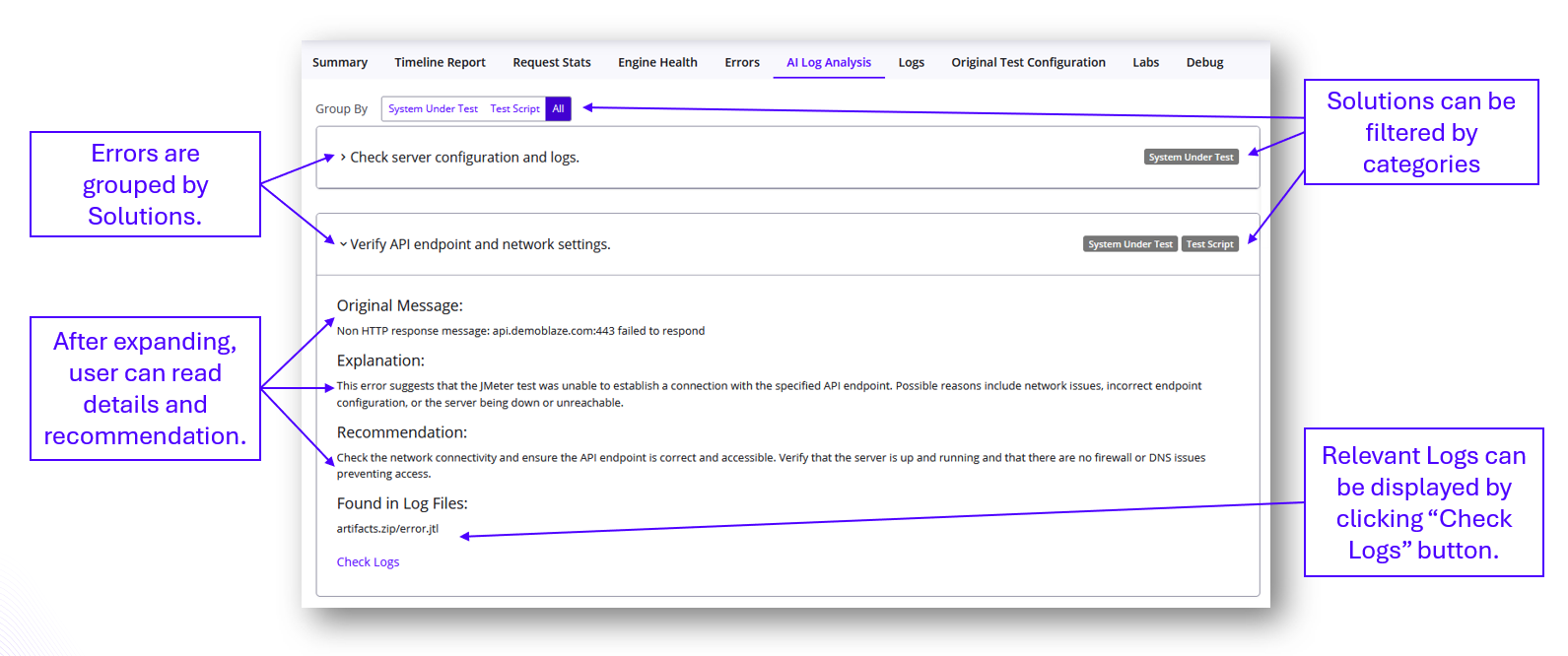
Troubleshooting performance test errors just got a lot easier. With AI Log Analysis, you no longer need to dig through raw logs to understand what went wrong.
-
Errors explained in plain language - see clear descriptions instead of cryptic log output.
-
Root cause clarity - errors are classified by type (infrastructure, script, or system under test).
-
Actionable guidance - get practical recommendations to help resolve issues faster.
-
Deeper investigation - direct links to relevant logs remain available when needed.
This release makes error analysis faster, clearer, and more accessible for all performance test users.
To learn more, see AI Log Analysis Report.
Service Virtualization
In this release, Service Virtualization includes the following enhancements:
Test Data models as SQL Tables
Working with multiple Test Data models in Virtual Services was previously complex and restrictive, making advanced data manipulation difficult. To address this, all Test Data models are now stored as standard SQL tables. This enhancement empowers users to:
-
Run sophisticated SQL queries with complex WHERE clauses to retrieve only the specific rows of data they need.
-
Access data across multiple Test Data models using standard SQL queries for seamless cross-model data access.
By leveraging the power of SQL, users can now achieve greater flexibility and precision in configuring Test Data within Virtual Services, resulting in a more powerful and scalable solution.
To learn more, see Make SQL Queries Against Service Data.
ShiftLeft Converter
In this release, ShiftLeft Converter includes the following enhancements:
Java support
The SLC now offers support for Java-based LoadRunner scripts, enabling seamless migration to the BlazeMeter ecosystem (Taurus/JMeter). This new capability includes both deterministic conversion and an AI-powered enhancement option: When a script’s conversion is incomplete, our AI assists in bridging gaps and reducing manual intervention.
Deterministic conversion for supported Java LoadRunner functions and constructs.
-
When full conversion is not possible, AI enhancement attempts to fill gaps with migration suggestions.
-
Unified migration workflow for both C and Java LoadRunner scripts, with clear indications where manual review is needed.
To learn more, see Shiftleft Converter - Changelog.
Post-conversion AI Assistant
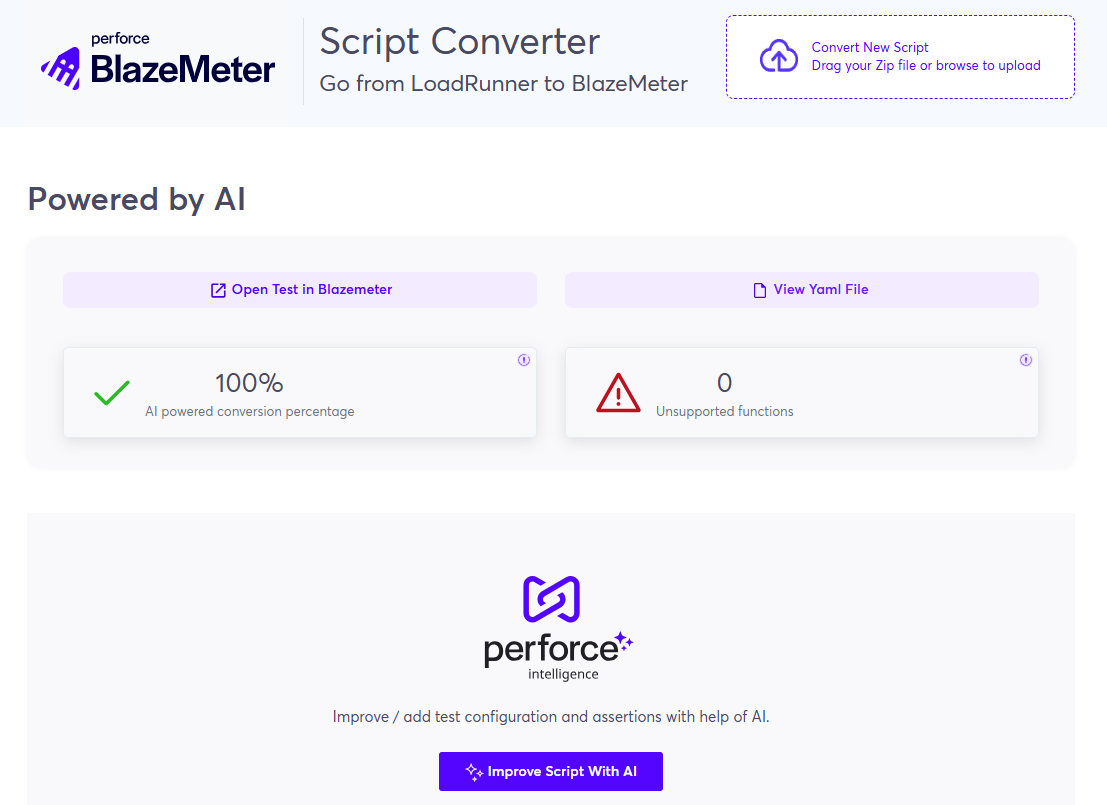
After converting LoadRunner scripts, users can now leverage an AI-powered assistant to intelligently suggest and apply optimal configurations and assertions to their JMeter YAML scripts.
The assistant analyzes each LoadRunner script, taking into account both best practices and the user’s current entitlement (such as available credits and plan limits).
This allows users to enhance test quality efficiently with minimal manual effort or technical expertise.
-
The AI assistant reviews the converted script and suggests up to 5 optimal configuration changes and 5 assertion types tailored to the script’s structure and goals.
-
Users can review, accept, and apply any combination of suggested assertions, and select one configuration update per iteration.
-
Includes version control: Users can roll back to previous script states, with a clear diff view of YAML changes for transparency and auditability.
-
All changes are applied via an LLM and instantly reflected in the BlazeMeter test interface for immediate execution.
See what's new in BlazeMeter 25-Q3-S5, released on September 15, 2025.
Performance testing
In this release, Performance testing includes the following enhancements:
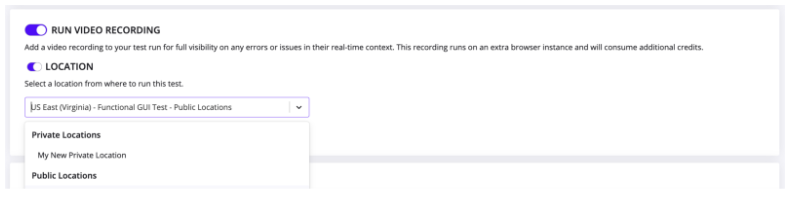
Video recording now supported on Private locations
Until now, customers running Browser-Based Tests on On-Premise Locations (OPLs) could not use the Video Recording feature, since recordings were always stored in the public cloud. This made the feature unusable for some key customers.
We’ve now added support for video recording on private locations, ensuring that recordings remain available and secure inside the customer’s firewall.
The Run Video Recording configuration now includes a dropdown to select the engine on which the video will run. Available options are the same as in EUX: OPLs configured with Functional tests, as well as the public locations we currently offer for Functional testing.
Impact: Expands usability of Browser-Based Tests for enterprise customers running on OPLs.
Service Virtualization
In this release, Service Virtualization includes the following enhancements:
Shared private locations across workspaces
You can now share private locations across multiple workspaces in Service Virtualization. This improvement helps you:
-
Use your private locations more efficiently.
-
Manage them more easily at the account level.
-
Deploy Virtual Services from any workspace that shares the location.
Even when a private location is shared, Virtual Services remain isolated - services deployed in one workspace are not visible in another.
To learn more, see Manage Private Locations.
API Monitoring
In this release, API Monitoring includes the following enhancements:
New bulk Action - Create new test from selected steps
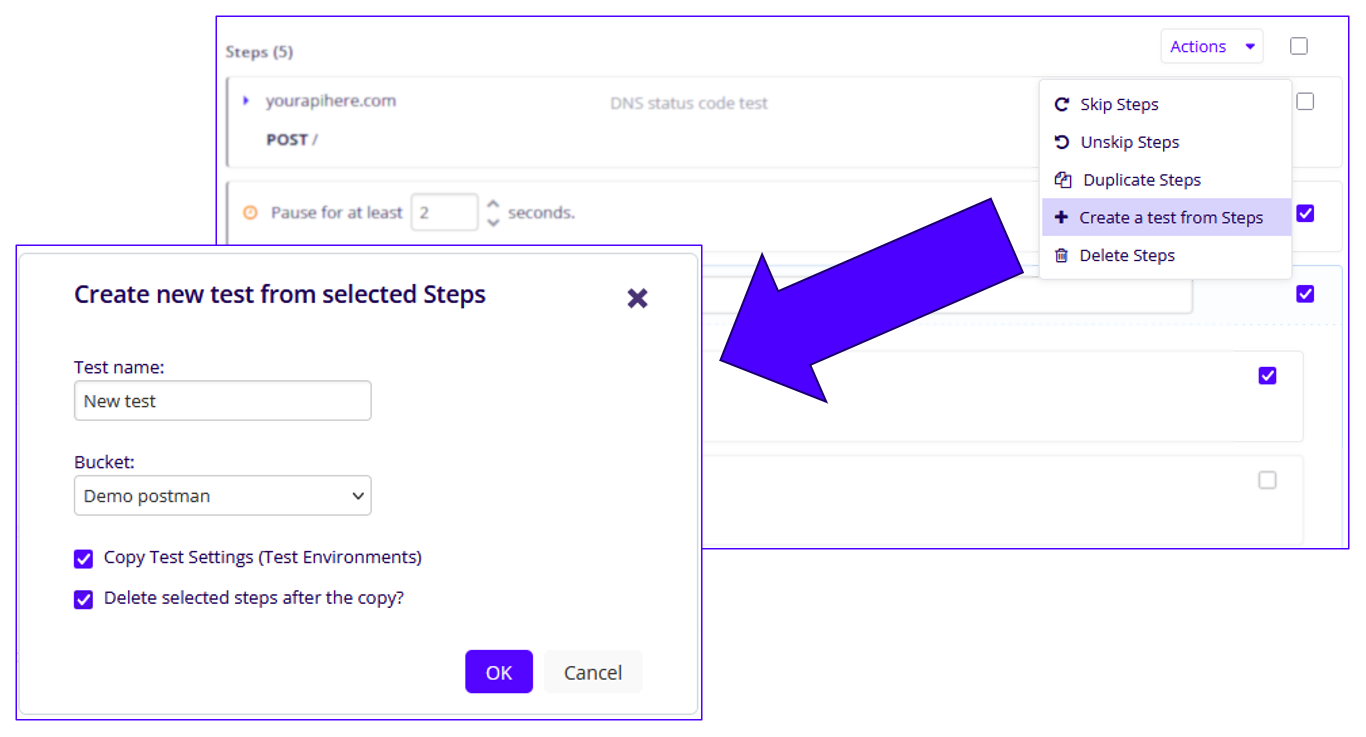
We’ve expanded the bulk Actions menu in the Test Editor. In addition to skipping, deleting, or duplicating steps, you can now create a new test directly from selected steps.
Simply select the steps, provide a test name and target Bucket, and choose whether to copy existing Test Settings or remove the original steps after creation.
AI Script Assistant now powered by Gemini AI
As part of our ongoing effort to consolidate AI services, the AI Script Assistant has transitioned from ChatGPT to Gemini AI. Functionality remains unchanged. The assistant continues to deliver the same value. This update also enables us to leverage features available exclusively in Gemini.
To learn more, see Using the API Monitoring AI Script Assistant.
See what's new in BlazeMeter 25-Q3-S4, released on September 1, 2025.
Secrets Management is now available to all enterprise customers
Secrets are objects that contain sensitive data, such as passwords, tokens, credit card numbers, or any other data that shouldn't be exposed.
Using Secrets in BlazeMeter:
-
You can safely use sensitive data in BlazeMeter tests without exposure.
-
You do not have to hard code any sensitive data into your test scripts.
-
Whenever a secret appears in reports or logs during and after run time, the value of the secret is masked.
-
Ensure compliance with enterprise security requirements.
-
Confidently adopt BlazeMeter’s AI capabilities with data masking in place.
-
Manage Secrets on the Workspace level to increase data security between teams.
-
The use of Secrets is supported by all test executers.
To securely mask sensitive information, use the prefix BZM_SECRET prefix in your Performance tests, GUI Functional tests, or Service Virtualization transactions.
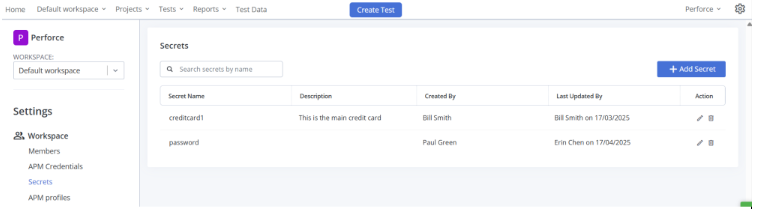
You can create and manage secrets on the Secrets page in your Workspace settings. All workspace members can view all secrets configured in the workspace. All roles except Viewer can create secrets. Once the secret is created, no one can see the value, protecting the sensitive data.
To learn more, see Create and Manage Secrets.
Advanced search - Improved workspace filtering for tags and projects
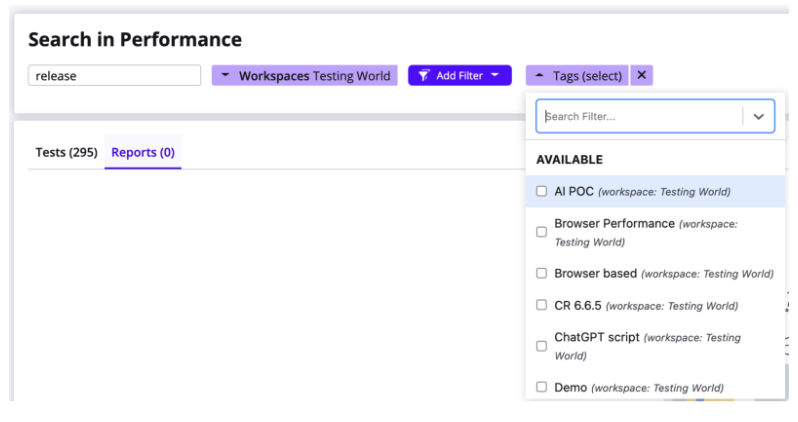
Finding the right tags and projects is now simpler. When you select a workspace, the Tags/Projects filter will only show items that belong to that workspace. Previously, the filter displayed all tags and projects across the account, making it harder to locate what you needed.
This improvement makes advanced search faster and more intuitive by respecting the workspace context when applying filters.
Service Virtualization
In this release, Service Virtualization includes the following enhancements:
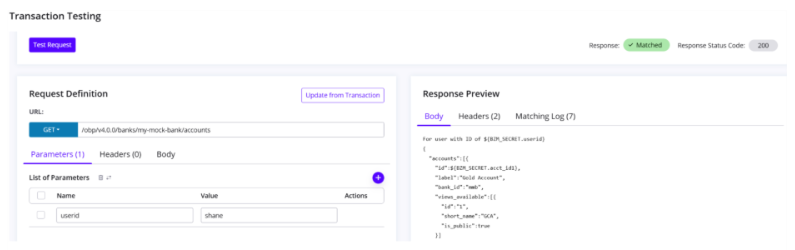
Sandbox mode for accelerated transactions testing
BlazeMeter Service Virtualization now includes a new feature: Sandbox Mode, available to all users. Previously, testing a modified transaction required adding it to a Virtual Service, restarting the service, and then validating it externally. Any subsequent changes meant repeating the same cycle by updating the Asset Catalog—an often tedious and time-consuming process.
With Sandbox Mode, every transaction can now be opened in an isolated environment, where users can edit request matchers, response matchers, URLs, and more. Most importantly, these edits can be tested instantly until users are satisfied with the results. Once finalized, changes can be persisted directly back to the transaction.
This streamlined workflow allows users to stay within BlazeMeter SV, make updates, validate them on the spot, and save time without leaving the product.

API Monitoring
In this release, API Monitoring includes the following enhancements:
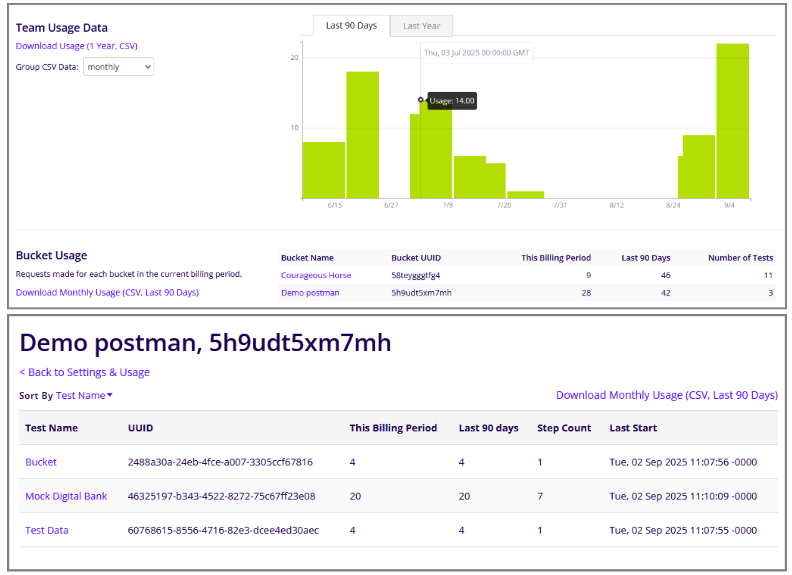
Improved usage metrics and CSV downloads
We’ve introduced several enhancements to make usage metrics more transparent and easier to analyze:
-
Bucket-level Test Metrics: A new sub-page under Settings & Usage shows detailed usage for each test in a bucket, including usage for the current billing period, last 90 days, step count, and last start time. A CSV download option for 90-day usage is also available.
-
Team Usage Data: The Team Usage view now includes both Last 90 Days and Last Year tabs, with corresponding graphs. A new CSV download option lets you export up to one year of usage, grouped by month, week, or day.
-
Bucket Usage CSV: From the Settings & Usage page, you can now download a CSV with bucket usage data for the last 90 days.
Together, these updates give teams greater visibility into usage trends and provide flexible ways to export data for further analysis.